
Managing your availability
Availability is how you tell your society when you can and cannot referee. The appointments team uses your availability to know who to consider for each fixture.
Who can do this?
| Role | Can manage availability? |
|---|---|
| Referee | Yes - own availability only |
| Appointments Manager | Yes - can lock availability (admin) |
| Society Admin | Yes - can lock availability |
| MOD / MOC | No |
How availability works
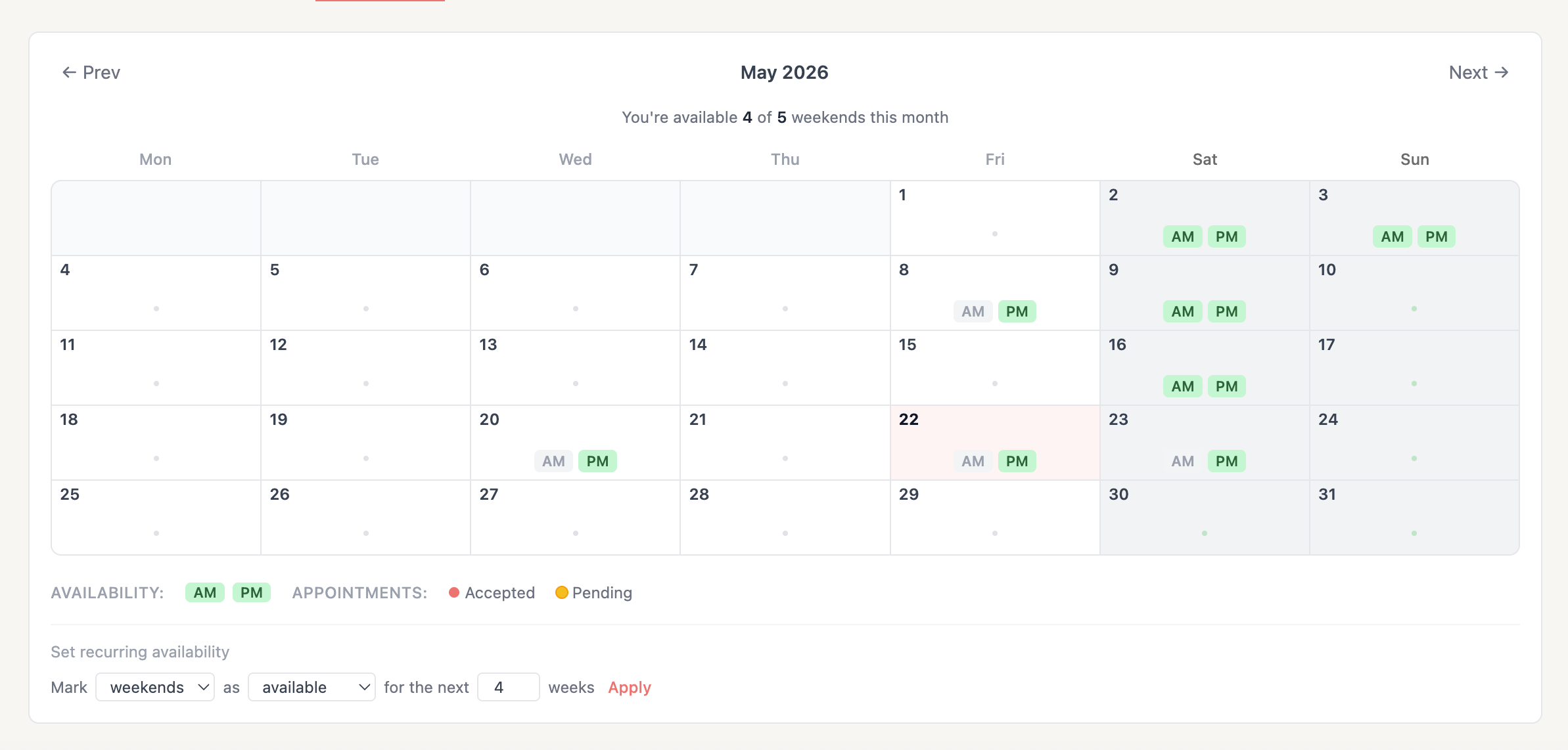
RefMatch uses date-based availability windows. For each date that has a fixture scheduled, you can mark yourself as:
- Available - you can referee on this date
- Unavailable - you cannot referee on this date (travel, injury, prior commitment)
- No response - you haven't indicated either way
The appointments team sees all three states when planning. Officials with no response can still be assigned, but available officials are prioritised.
Note: You can only see and edit your own availability. The appointments team and society admins can see all officials' availability.
Setting your availability
- Go to My Overview or navigate to Availability in the menu
- You will see a calendar or date list showing upcoming fixtures
- For each date, click or toggle to mark yourself Available or Unavailable
- Changes are saved automatically
Tip: Set your availability as soon as you know your schedule for the coming weeks. The appointments team typically plans one to two weeks ahead.

Changing your availability
You can update your availability at any time before the appointments team has assigned you to a fixture.
If you have already been assigned to a fixture (pending or confirmed status) and your availability changes, do not simply mark yourself unavailable - contact your appointments secretary directly to discuss the best way to handle it.
Warning: Marking yourself unavailable after accepting an appointment does not automatically remove you from the fixture. You must notify your appointments team.
Availability and appointments
The relationship between availability and appointments:
| Your availability | What the appointments team sees | Can you be assigned? |
|---|---|---|
| Available | Green indicator | Yes - preferred |
| No response | Amber indicator | Yes - but uncertain |
| Unavailable | Red indicator | No |
| Locked by admin | Lock icon | Managed by society |
Locked availability
In some cases, a society admin or appointments manager may lock your availability for a specific date. This typically happens when:
- A date has been reserved for a specific event (e.g. a society coaching day)
- An official has been committed to a fixture by the society secretary
Locked availability cannot be changed by the official. Contact your society admin if you believe a lock was applied in error.